Connect your enterprise CCTV security streams directly onto our decentralized network cluster. Real-time telemetry logging, AI smart motion alerts, and instant encrypted storage space allocation.
Traditional CCTV recordings sit on local hard drives or SD cards inside the building. When intruders break in, destroying or stealing the physical recorder eliminates 100% of the video evidence.
Hunubi Cloud VMS streams live footage encrypted over the high-speed CoLi Link network in real-time. Even if physical hardware is destroyed or stolen seconds later, high-definition evidence is already locked in cloud vaults.
Advanced remote surveillance automation infrastructure designed for mission-critical reliability and zero downtime.
Your video partition arrays are encrypted on disk rails natively using military-grade AES-256 standards, completely isolated from side-channel sniffing loops.
When you subscribe, our core load balancers dynamically allocate your video streams onto the slot node matching your capacity thresholds perfectly.
Natively supports ONVIF, RTSP, and standard H.264/H.265 streams across all major DVR/NVR brands, seamlessly bridged to cloud via CoLi Link Network or our plug-and-play CoLi VPN Box.
No technical skills required. Connect any camera recorder to Hunubi Cloud in under 5 minutes.
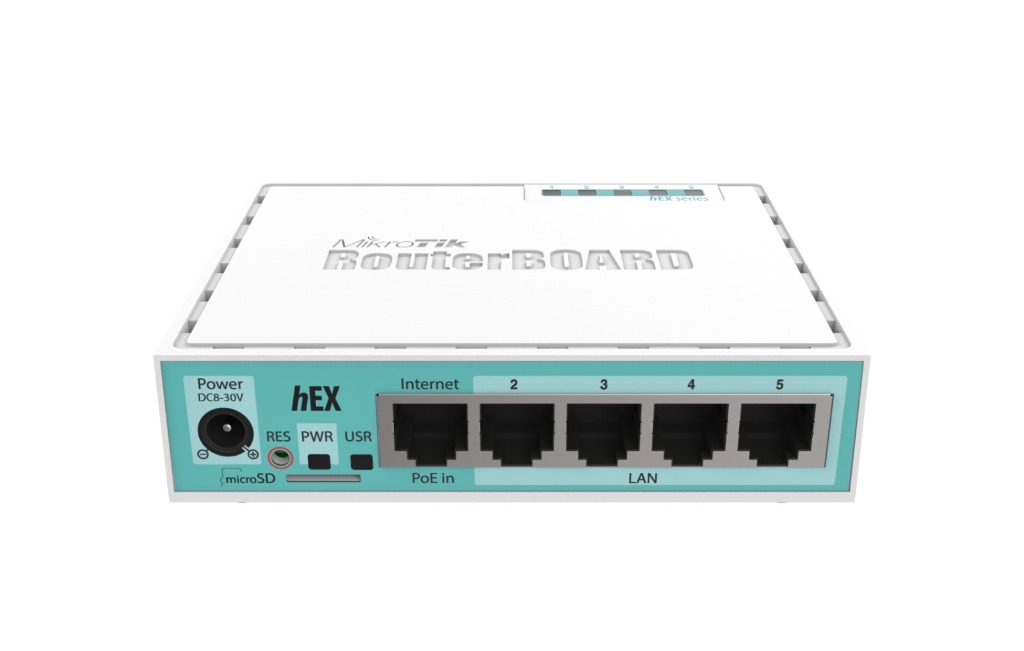
Choose how much recording space you need (from 120 GB up to 2,000 GB). If your building is outside the CoLi Link fiber network or doesn't have a Static Public IP from your internet provider, request the managed CoLi VPN Box (pre-configured MikroTik router provided by CoLi Link — ¢120.00 one-time setup fee; equipment is not for retail sale).
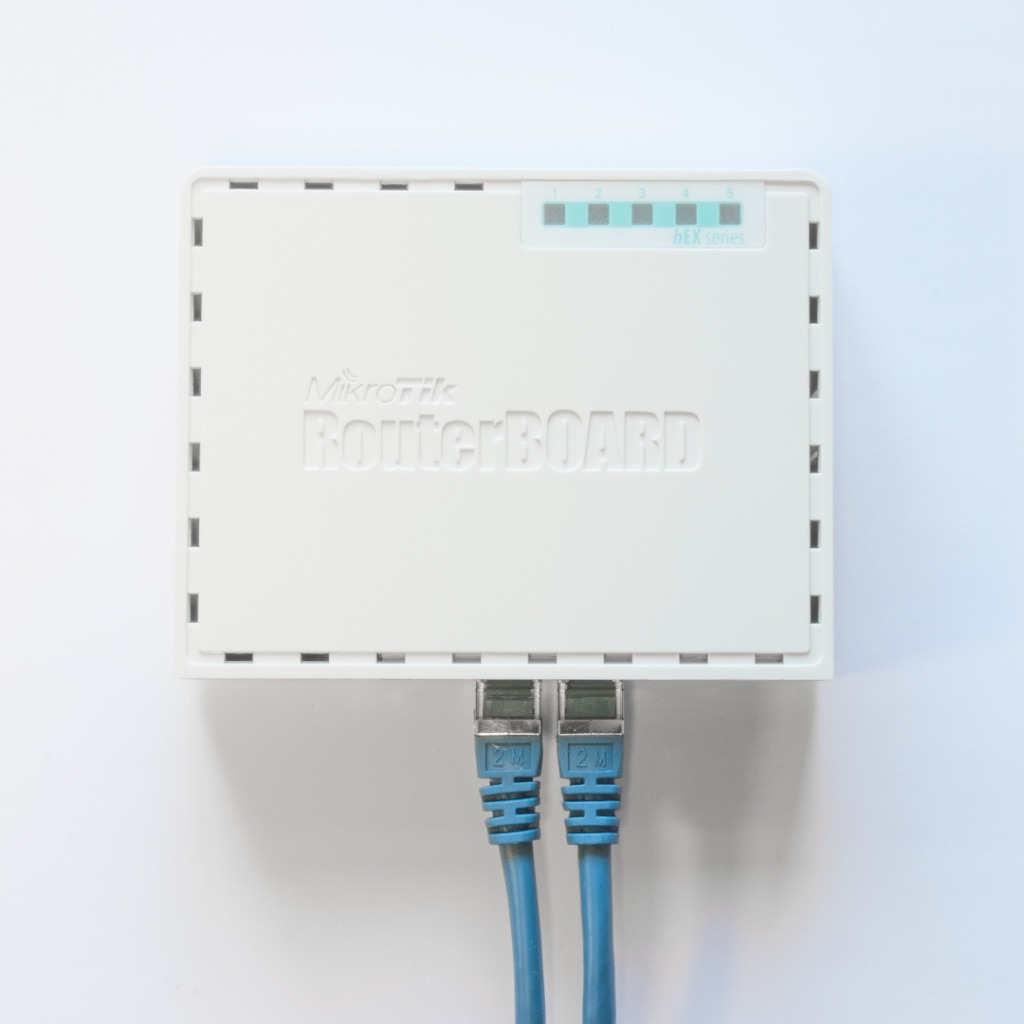
Plug in the power cord. That's it! The box automatically connects to our cloud and gives you a dedicated Static Public IP. No router configuration required.
Open your phone or computer, log into your Hunubi Portal, click Register New Recording Node, and enter your assigned Static Public IP.
Your cameras instantly begin mirroring encrypted, off-site surveillance backup to your cloud storage vault!
Keep your costs to a minimum. Never sacrifice performance. No commitments or minimums required.
Pick your disk threshold capacity. Flexible monthly cloud storage vaults with instant node allocation.
Required for locations outside the CoLi Link fiber network. We provide a pre-configured MikroTik router on active subscriptions to bridge your on-premise NVR/DVR securely into Hunubi Cloud with zero complex network configuration.
Official system operations manual, camera configuration matrices, and technical architecture guides powered by CoLi Link Ghana Limited.
To access your workspace dashboard, navigate to the secure portal login page. Workspace Owners require their unique numeric Workspace ID and master password. If your administrator has issued you a sub-account, log in using your specific sub-user handle and assigned password.
For enterprise-grade security, workspace owners can activate Two-Factor Authentication directly from the Account Center:
If you misplace your master password, click the "Forgot Password" link on the login page. A secure, time-locked password reset token will be dispatched to your registered email address. This token strictly expires after 15 minutes. Any successful password modification will trigger an automated security audit email to the workspace owner.
The Hunubi platform connects directly to your local IP cameras using RTSP (Real-Time Streaming Protocol). To add a new camera stream:
Active cameras can be scheduled to record continuously (24/7) or restricted to custom operational time windows (e.g., Mon–Fri, 18:00 to 06:00) to conserve storage vault quota. Click the modify icon next to any camera to adjust scheduling metrics or update IP/credentials if your local network changes.
To manage multiple devices simultaneously, use the Select All checkbox in the Configured Recording Cluster panel. You can instantly Start, Stop, or Delete all selected recording streams with a single click.
Recorded clips are organized securely within your isolated vault. Use the Timeline Search bar to filter assets by Specific Date (YYYY-MM-DD), Time Window, or Camera Nickname. Videos can be streamed directly in the browser or downloaded natively as MP4 files. To free up storage space, select multiple clips and execute a Batch Delete transaction.
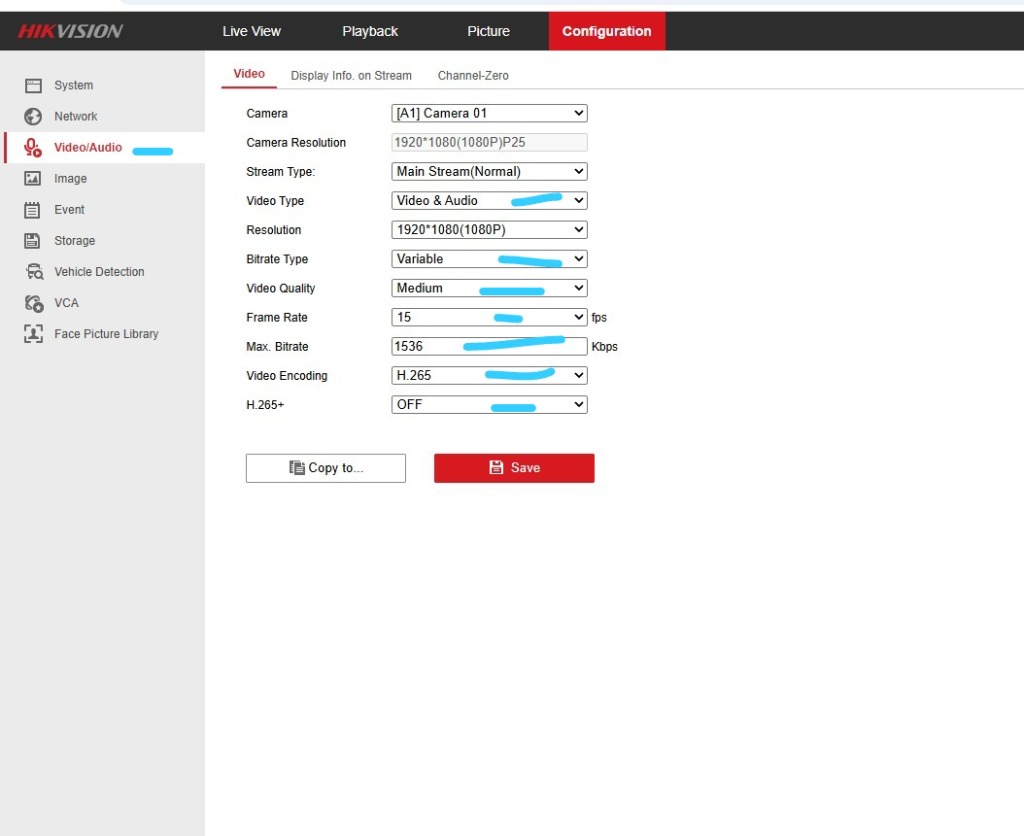
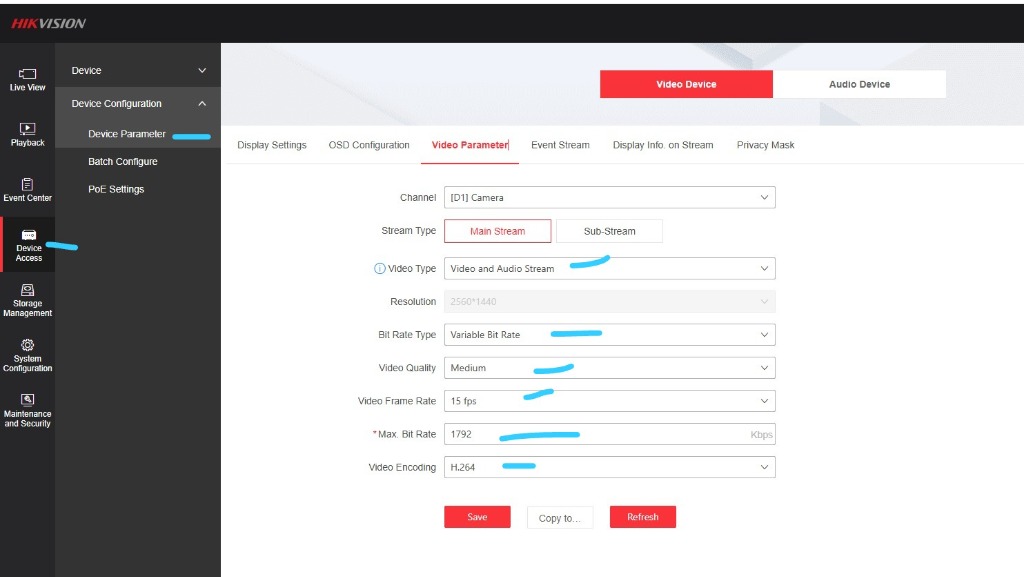
Configure the parameters on your camera or NVR web interface (Hikvision, Dahua, Uniview, etc.) to match these standard production values. These settings ensure fluid recording quality, prevent network saturation, and reduce monthly cloud storage consumption by 30% to 40%:
| Configuration Parameter | Factory Default | Recommended Value | Impact & Efficiency Benefit |
|---|---|---|---|
| Stream Type | Main Stream |
Main Stream (Normal) |
High-definition primary feed for secure evidence retention. |
| Video Type | Video |
Video & Audio |
Captures synchronized audio along with surveillance video frames. |
| Frame Rate | 25 - 30 fps | 15 fps |
Massive data saver. Standard security recording does not require 30 fps motion. Dropping to 15 fps eliminates unnecessary intermediate frames, cutting file size by 35% to 40% with zero loss in evidentiary clarity. |
| Bit Rate Type | Constant (CBR) |
Variable (VBR) |
Dynamically drops bitrate when there is no scene movement, conserving data during idle nighttime hours. |
| Video Quality | Higher / Highest |
Medium |
Optimal sweet spot between crisp image fidelity and storage efficiency. |
| Max. Bitrate | 3072 - 4096 Kbps | 1536 to 1792 Kbps |
Caps bandwidth consumption. Perfectly matches 1080P resolution at 15 fps, preventing cameras from saturating local or VPN upload bandwidth. |
| Video Encoding | H.265 / H.264 |
H.264 (Universal) / H.265 |
Hardware accelerated on mobile. H.264 provides seamless live browser playback on iPhones and Android without transcoding CPU load. |
| H.265+ / Smart Codec | ON (Proprietary) |
OFF |
Proprietary I-frame compression (Hikvision H.265+) can cause RTSP packet buffering on remote streams; keep OFF for rock-solid stability. |
Verified web console captures highlighting each critical field on both Hikvision IP Cameras and Hikvision NVRs:
Your workspace is governed by your assigned Subscription Tier (Micro, Lite, Semi, Pro, Pro Plus, Enterprise), which dictates your maximum cloud storage vault size in Gigabytes (GB). If you reach your storage threshold, you must either delete older footage or upgrade your plan.
The Account Center logs all transaction footprints, dates, amounts billed, and applied taxes. Successful payments allow you to download an official PDF Receipt, while unpaid or pending charges allow you to download a formal PDF Invoice.
Workspace owners can delegate restricted operational access to security guards, control room operators, or administrative staff without sharing the master password. When creating a child profile in the Access Control (ACL) menu, you can explicitly toggle the following permission flags:
| Permission Flag | Capabilities Granted |
|---|---|
Start/Stop Recording |
Allows the user to pause or resume active cluster writing streams. |
Modify Nodes |
Permits changing camera IP addresses, passwords, and custom time schedules. |
Delete Nodes |
Allows permanent removal of hardware cameras from the active portfolio. |
Download Archives |
Grants access to save MP4 files to a local desktop workstation. |
The integrated Support Inbox allows you to communicate directly with system administrators, report stream abnormalities, and track technical resolutions:
If your local Internet Service Provider (ISP) does not provide a Static Public IP address, Hunubi provides the CoLi VPN Box — the CoLi VPN Box — managed MikroTik routing equipment deployed by CoLi Link (not sold as retail hardware) to securely bridge your cameras to our cloud cluster.
Navigate to the VPN Box Configuration card in your Account Center. Select your preferred delivery mode (Office Pick Up or DHL Courier) and pay the one-time setup invoice (¢120.00 GHS setup and provisioning fee). Note: The MikroTik router remains the property of CoLi Link as managed equipment and is provided on active subscription — it is not for retail sale.
Once your payment is verified and the hardware is dispatched, a network administrator remotely maps your L2TP tunnel credentials. Your dedicated Static Public IP Address will appear directly in your dashboard, which you enter when adding cameras via the Setup Wizard.
The CoLi VPN Box incurs a package-based Monthly Recurring Charge (MRC) ranging from ¢30.00 to ¢300.00 / month depending on your subscription tier, bundled dynamically into your standard CCTV plan renewals.
Search clients by numeric Workspace ID, email, or company name. Admins can update contact records, adjust pricing tiers, or freeze/suspend accounts for non-payment.
Super Admins can register new standalone storage slave nodes via IP and SSH credentials. The Master node will automatically transfer environment scripts, bootstrap TLS/SSL certificates, and configure reverse proxies.
View enterprise financial aggregates across Total Revenue, Receivables, and VAT/NHIL Tax. Super Admins possess granular authority to perform manual, off-platform wallet adjustments and issue PDF tax invoices.
Manage incoming client tickets. Admins utilize predefined templates for rapid responses, attach diagnostic files, and update ticket statuses. Tickets marked as "Answered" are automatically closed after 7 days of client inactivity.
Engineering updates, platform optimization guides, and security administration insights.
Our infrastructure operations engineering grid is standing by 24/7.
49 Gen Ankrah High St, Accra, Ghana (GA-561-1984)
Under 15 Minutes on Active Firewalls
