Official Production Standard

Camera & Gateway Setup Manual

Production-ready parameters for integrating surveillance recorders (Hikvision, Uniview, Axis, Dahua) and the MikroTik CoLi VPN Box onto the Hunubi Cloud VMS network.

CoLi VPN Box (MikroTik Router) Setup

Required for installations outside the CoLi Link fiber network or without a dedicated Static Public IP. Equipment Notice: The MikroTik router is managed equipment provided by CoLi Link on active subscriptions and is not for retail sale. The one-time ¢120.00 invoice covers cloud setup, remote tunnel provisioning, and Static Public IP allocation.
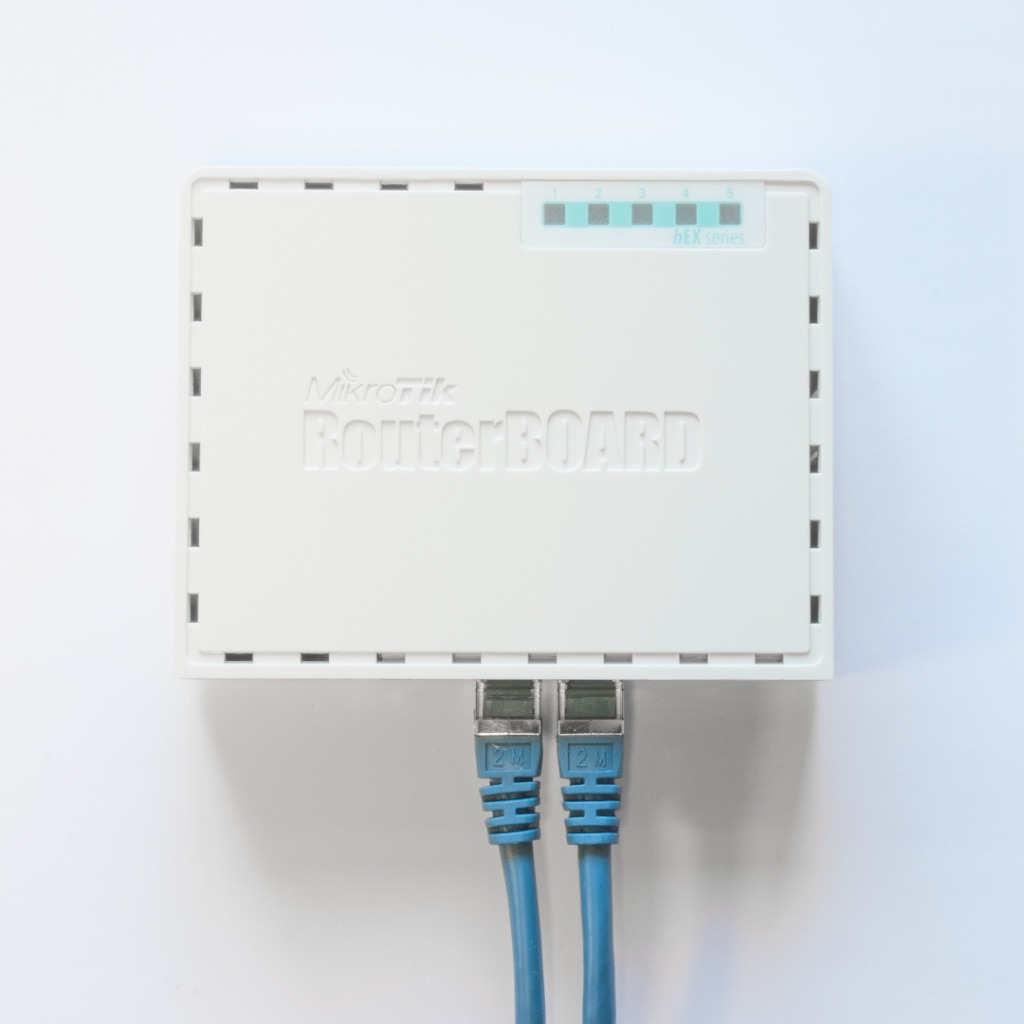
PLUG & PLAY ARCHITECTURE
MikroTik Router with two blue ethernet cables connected to Port 1 and Port 2
MikroTik RouterBOARD • Managed Equipment (Not for Sale)
1
Port 1 (Internet In):

Plug the incoming internet cable from your ISP modem or router into Port 1.

2
Port 2 (CCTV In):

Plug the network cable from your local DVR, NVR, or camera switch into Port 2.

3
Power Adapter:

Connect the included DC power adapter. The router automatically dials into our secure cloud cluster.

4
Portal Registration:

Inside your Hunubi account, select Register New Recording Node and enter the dedicated Static Public IP assigned to your VPN Box certificate.

Zero Port-Forwarding: The VPN Box establishes a secure encrypted tunnel back to the Hunubi cluster automatically. You do not need to log into your customer's main router or request ISP port forwarding.

Hikvision Configuration Map

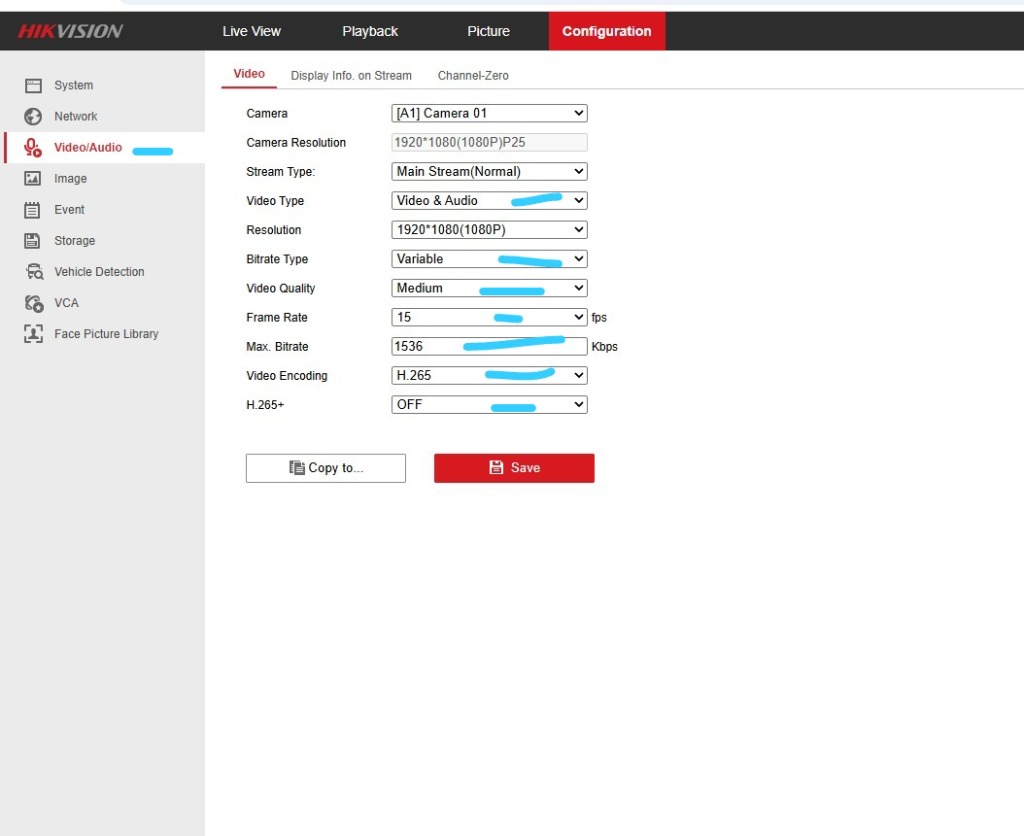
Standard settings for Hikvision IP Cameras, Hybrid DVRs, and NVRs.

Configuration → Video/Audio → Video
Stream Type
Main Stream (Normal)
High-definition feed for evidence recording.
Video Type
Video & Audio Recommended
Records synchronized ambient audio track.
Resolution
1920 × 1080 (1080P)
Full HD legal surveillance standard.
Bitrate Type
Variable (VBR)
Lowers data during static scenes (e.g. night).
Video Quality
Medium
Optimal image fidelity without bit spikes.
Video Encoding
H.264 (Universal) / H.265
H.264 is hardware accelerated across all mobile web browsers.
NVR Bulk Configuration: If configuring through a Hikvision NVR web interface, use the Copy to... button to propagate these settings across all camera channels with a single click.

Production Interface References

Hikvision Classic Web Configuration
FIGURE 2.1 Hikvision Classic Web GUI (Click to Zoom)
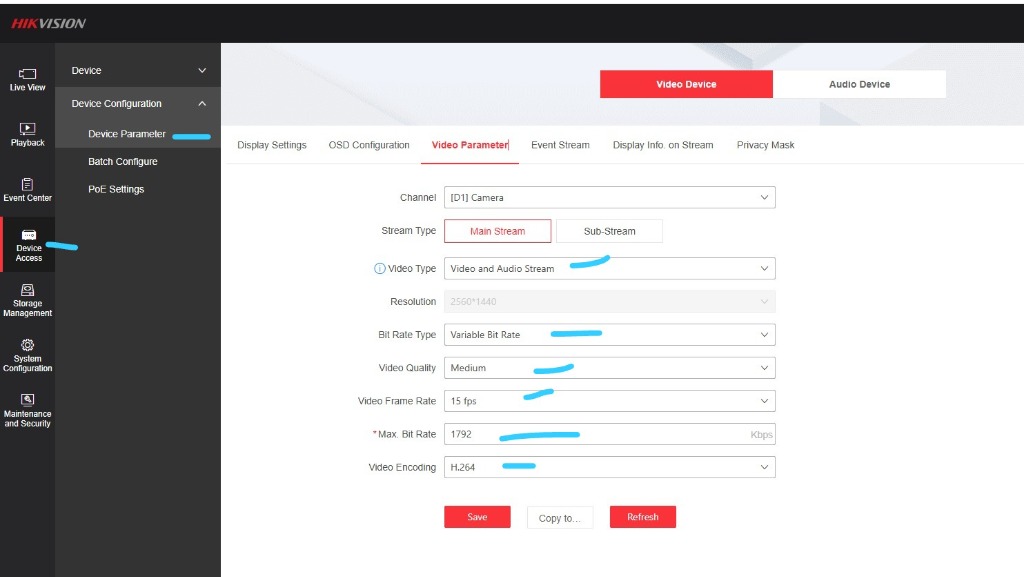
Hikvision Modern NVR Web Interface
FIGURE 2.2 Hikvision NVR Modern GUI (Click to Zoom)

Uniview (UNV) Configuration Map

Standard production settings for Uniview IP cameras and UNV NVRs.

Setup → Video & Audio → Video
Stream Type
Main Stream
Full resolution cloud archival feed.
Video Compression
H.265 / H.264
H.264 recommended for universal browser decoding.
Resolution
1920 × 1080 (1080P)
Standard Full HD clarity.
Bitrate Type
VBR (Variable)
Adjusts bitrate dynamically based on activity.
Image Quality
Medium
Optimal balance between clarity and file size.
Audio Stream
Enabled
Enables synchronized audio capture on microphone-equipped channels.
Uniview Save Action: Click Save at the bottom of the page. Settings take effect immediately without requiring an NVR restart.

Axis Communications Configuration Map

Production settings for Axis fixed and dome IP cameras.

Stream Profiles → Video Stream
Compression Format
H.265 / H.264
Standard H.264 recommended for cross-platform playback.
Resolution
1920 × 1080 (1080P)
High definition video stream.
Bitrate Control
Variable Bitrate (VBR)
Maintains quality while saving storage during quiet periods.
Target Quality
Medium / Standard
Standard quality level prevents bitrate bloat.
Audio
Enable Audio
Under the Audio tab, check Enable Audio (Duplex or Mic-in).
Axis Tip: After setting Zipstream to Off and Bitrate to 1536 kbit/s, click Save and verify in the Live View tab.

Dahua Technology Configuration Map

Standard settings for Dahua IP Cameras, XVRs, and NVRs.

Setting → Camera → Video → Video Stream
Stream Type
Main Stream
Primary stream for off-site recording.
Compression
H.264 / H.265
H.264 decodes natively in all modern web portals.
Resolution
1080P (1920 × 1080)
Full HD forensic standard.
Bit Rate Type
VBR (Variable)
Dynamic bit allocation based on motion.
Quality
4 (Medium)
Standard Dahua quality level 4.
Audio Encode
Enabled (AAC / G.711A)
Synchronized audio tracks.
Dahua Quick Copy: On Dahua NVRs, click Save and select Copy to... to duplicate the 15 fps and 1536 Kbps configuration to all channels.

Standard RTSP URL Syntax Construction Guide

Syntax patterns for manual stream testing (VLC) and node onboarding in the Hunubi Portal.

RTSP INGESTION SPECIFICATION
Hikvision (Channel 1 Main Stream):
rtsp://[user]:[password]@[IP]:554/Streaming/Channels/101
Uniview UNV (Channel 1 Main Stream):
rtsp://[user]:[password]@[IP]:554/unicast/c1/s0/live
Axis Communications (Default Profile):
rtsp://[user]:[password]@[IP]:554/axis-media/media.amp
Dahua Technology (Channel 1 Main Stream):
rtsp://[user]:[password]@[IP]:554/cam/realmonitor?channel=1&subtype=0
Generic ONVIF Standard:
rtsp://[user]:[password]@[IP]:554/onvif1
IP Address Note: When routing through the CoLi VPN Box, replace [IP] with your assigned Static Public IP.
Enlarged Preview